Shopify Store Getting Visitors but No Sales? How to Find and Fix the Leak
- Zero sales is normal under ~300 visits. Above 1,000, there is a clear leak.
- Find the one funnel stage that is far worse than the rest before changing anything.
- Most new stores leak on the product page: photos, trust, price context and delivery time.
- Show shipping cost and delivery time before the cart to stop checkout stalls.
- Change one thing at a time and give it 200 to 300 visits before judging.
You launched the store. You shared it, maybe ran a few ads, and Shopify shows people are visiting. But the orders tab is still empty. That is one of the most discouraging spots to be in, and it is also one of the most fixable.
Here is the good news: "no sales" is almost never one big problem. It is usually a leak at one specific step between someone landing on your store and someone paying. Find that step and you know exactly what to fix. Guessing, on the other hand, is how people end up changing their theme three times and still selling nothing.
This guide walks you through finding the leak first, then fixing it. Give yourself about an hour.
Step 1: Check you have enough visitors to judge
Before anything else, look at the number. The average Shopify store turns roughly 1 to 2 out of every 100 visits into an order (the commonly cited figure is about 1.4%). So if you have had 60 visitors, zero sales is normal. It is not a verdict on your store yet.
- Under 300 visits: you have a traffic problem first. Keep reading, but your priority is getting more of the right people in.
- 300 to 1,000 visits and no sales: something on the store is very likely stopping people.
- Over 1,000 visits and no sales: there is a clear leak, and the steps below will find it.
You can see your numbers in Shopify under Analytics. Look at sessions, then the conversion funnel: sessions, added to cart, reached checkout, completed checkout. If conversion rate is a new term for you, it is simply orders divided by visits.
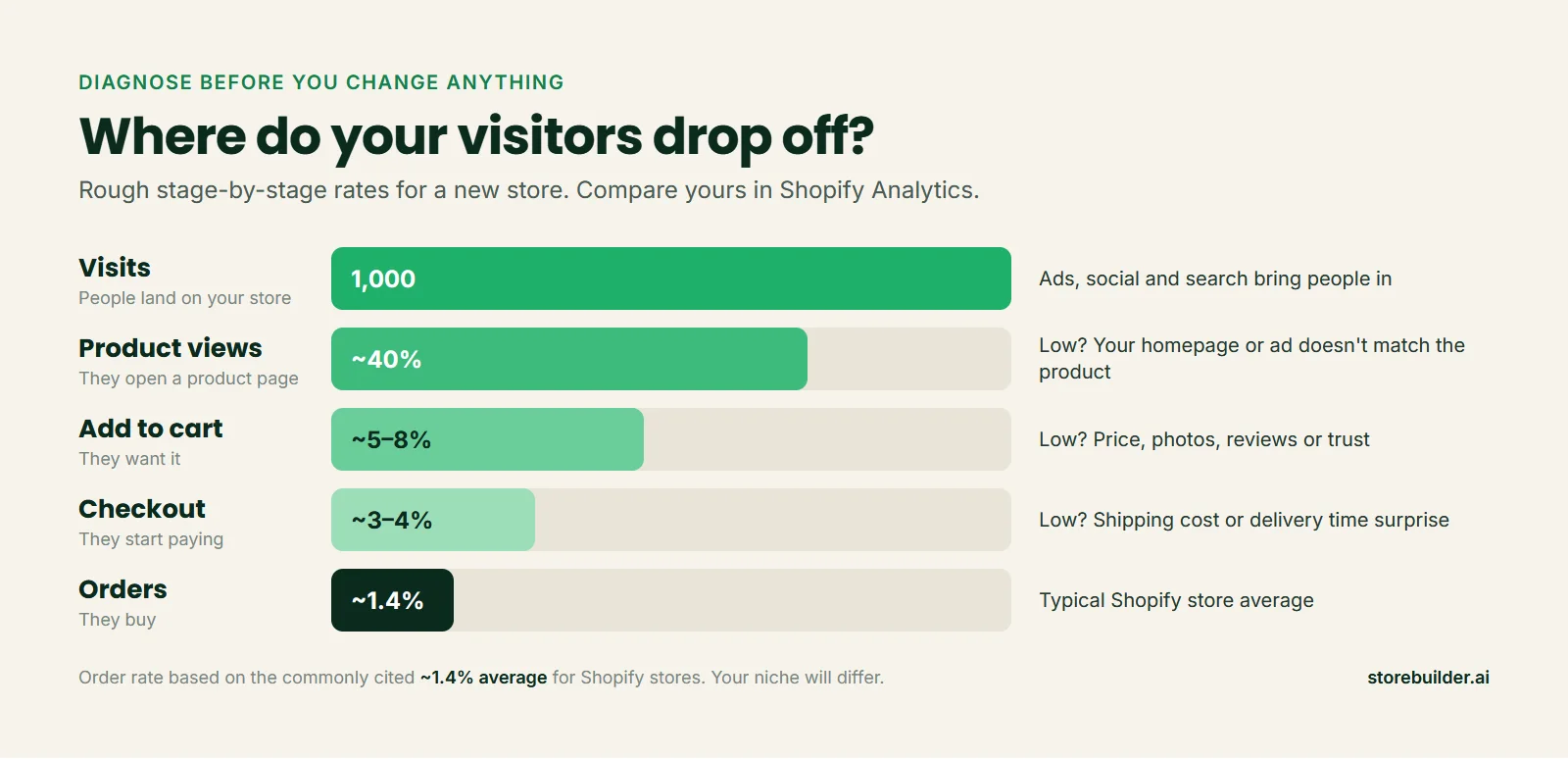
Step 2: Find the stage where people drop off
Compare your own funnel to the rough rates above. You are not looking for perfect numbers. You are looking for the one stage that is far worse than the rest.
Lots of visits, few product views
People arrive and leave without opening a single product. That usually means what they saw before clicking (your ad, your post, your search result) does not match what they see when they land. Someone clicked an ad for a dog harness and landed on a homepage full of cat toys. They are gone in four seconds.
Fix: send ad traffic straight to the product page, not your homepage. Make the first screen of your store say clearly what you sell and who it is for.
Product views, but almost no add to carts
This is the most common leak for new stores. People are interested enough to look, then something on the product page stops them. Usually it is one of these:
- Weak photos. One small supplier image is not enough. Shoppers want to see the product from several angles and, ideally, in use.
- No reason to trust you. A brand-new store with no reviews, no contact details and a generic name feels risky.
- Price with no context. If the price feels high and you have not explained why it is worth it, people leave to compare elsewhere.
- A wall of supplier text. Long, copied descriptions full of specs do not answer the real question: "Is this right for me?"
If you want to see what a page built around these questions looks like, our high-converting product pages breakdown shows a real example.

Add to carts, but checkouts stall
Shoppers added the product, then left at the cart or checkout. The cause is almost always a surprise: shipping costs that appear late, a delivery time that is longer than they expected, or a checkout that asks for too much. Industry research puts the average cart abandonment rate around 70%, so some drop-off is normal. A total stall is not.
Fix: show shipping cost and delivery time on the product page, before the cart. Then set up the abandoned checkout emails Shopify already includes. We walk through that in our guide to recovering abandoned checkouts.
People start checkout but never pay
If shoppers reach the payment step and stop, test the checkout yourself. Broken payment settings, a missing payment method or a store still in test mode can quietly block every order. Place a real test order with your own card and refund it afterwards.
💡 Beginner tip: Use a friend who has never seen your store. Give them $20, ask them to buy something, and watch them do it on their phone without helping. Where they hesitate is where your customers hesitate.
Step 3: Run the 10-minute store audit
Once you know the stage, go through this checklist. Most stores with traffic and no sales fail at least three of these, and every one of them can be fixed in an afternoon.
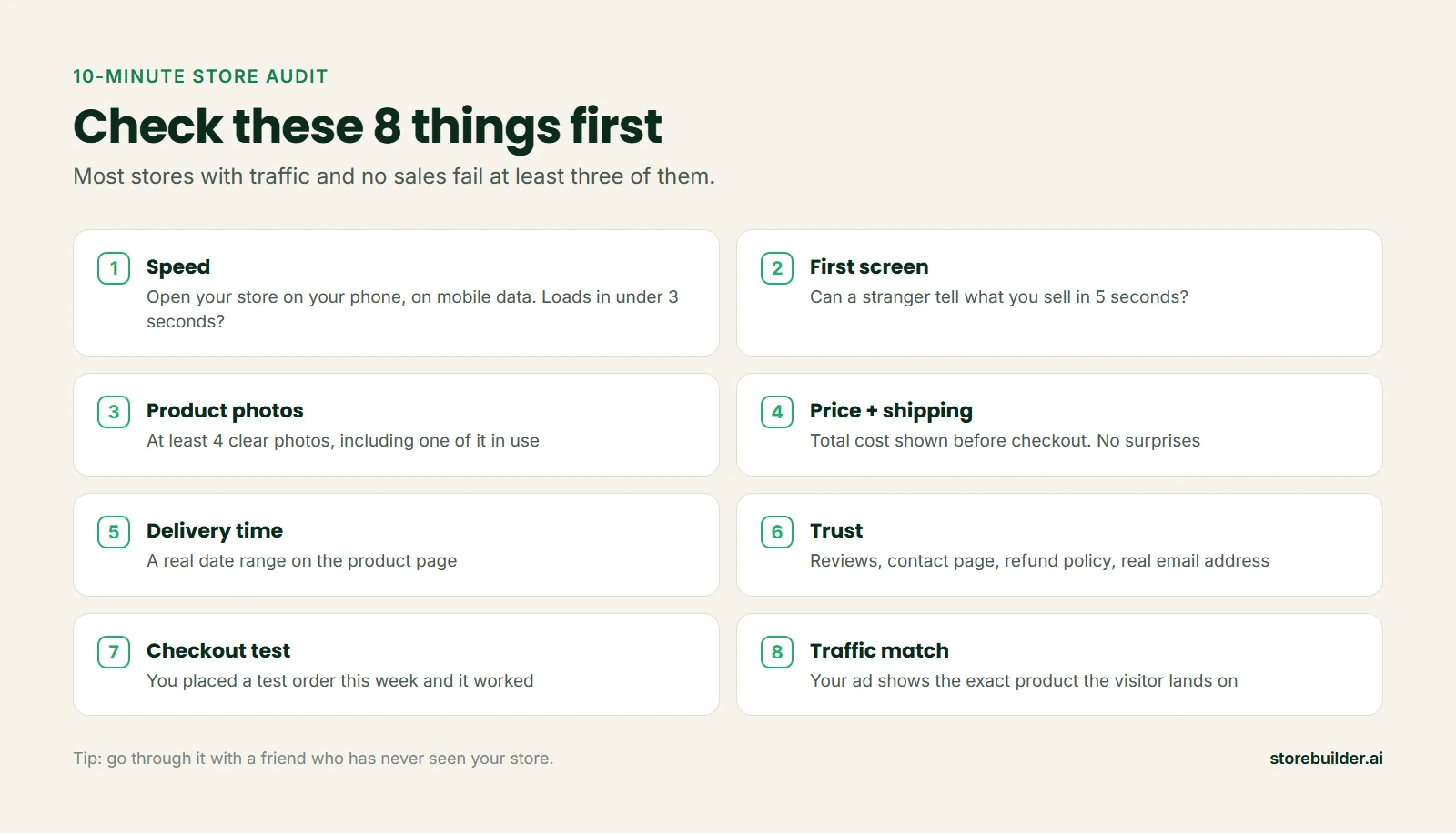
Speed
Most of your visitors are on their phones, often on mobile data. If your store takes more than a few seconds to show anything, a good share of them leave before seeing a product. Big uncompressed images and too many apps are the usual culprits. Remove apps you are not actively using.
Trust
A new store needs to work harder to look real. At a minimum you want: a contact page with a real email address, a clear refund policy, a shipping policy with actual numbers, and an About page that says who is behind the store. Reviews help more than almost anything else once you have them.
Delivery time
"Ships in 2 to 4 weeks" is enough to end most impulse purchases. If your products ship from overseas, that alone can explain a store with interest but no orders. We cover how to fix this in our guide to dropshipping shipping times.
Step 4: Fix the traffic, not just the store
Sometimes the store is fine and the visitors are wrong. A few signs you have a traffic problem rather than a store problem:
- Most visits last only a couple of seconds.
- Visitors come from countries you do not ship to.
- Your traffic comes from a giveaway, a "follow for follow" group or a cheap traffic service.
- Your ads target a broad audience with no clear interest in what you sell.
Ten people who actually want your product are worth more than a thousand who do not. Start with one channel you can learn properly, whether that is TikTok, Instagram, Pinterest or search. Our Shopify marketing guide covers how to pick one and what to post. For search, start with the basics in our Shopify SEO guide.
💡 Beginner tip: Before spending more on ads, make sure the exact product in the ad is the first thing people see when they land. That one change often does more than a new ad creative.
Step 5: Change one thing at a time
It is tempting to change everything at once. Resist it. If you swap the theme, rewrite every product page and change your prices in the same week, you will never know what worked.
- Pick the worst stage from Step 2.
- Make one or two changes aimed only at that stage.
- Wait for at least 200 to 300 new visits.
- Compare the numbers, then move to the next stage.
It is slower, but it is the only way to learn what your customers actually respond to.
When it might be the product
If you have fixed the store, the traffic is the right audience and you still have nothing after a couple of thousand visits, the product itself may be the issue. Maybe it is too easy to find cheaper elsewhere, or it solves a problem people do not really have. That is not failure. It is information. Test a different product in the same niche rather than starting over from scratch.
If you would rather start from a store that already has the basics right (proven products from US and EU suppliers, clear product pages, real policy pages), you can build a free store with storebuilder.ai in under a minute and compare it side by side with yours.
FAQ
How long does it take to get the first sale on Shopify?
It depends almost entirely on traffic. With a well-set-up store and a few hundred interested visitors, many stores see a first order within the first couple of weeks. With very little traffic, it can take much longer. That is why traffic is the first thing to check.
Is 0 sales after 1,000 visitors normal?
No. At typical conversion rates, 1,000 visits should bring in at least a handful of orders. Zero usually points to a clear leak, most often on the product page or at checkout, or to traffic that was never interested in the first place.
Should I lower my prices to get sales?
Usually not as a first step. Low prices can make a new store look less trustworthy, and they eat your margin. Fix trust, photos, delivery time and shipping cost first. If people still leave at the product page after that, then test the price.
Does my Shopify theme affect sales?
Less than most people think. A clean, fast theme helps, but switching themes rarely fixes a store with no sales on its own. What is on the page (photos, copy, reviews, shipping info) matters far more than which theme shows it.

We help Shopify merchants and online sellers worldwide build stores that succeed and grow, with practical, no-fluff guides for every stage, from launch to loyal customers.