- Home
- Shopify Website Builder
A Shopify website builder that writes, designs and stocks every page
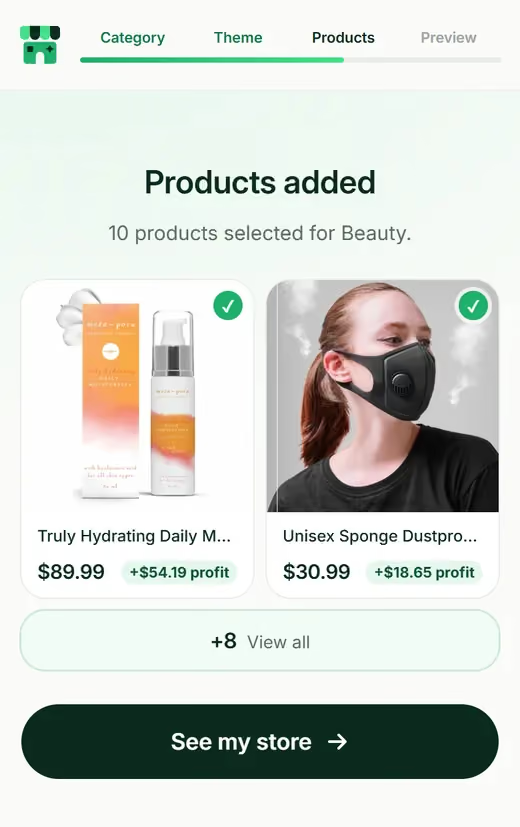
Skip the blank theme. Pick what you sell and get a complete Shopify website: six kinds of pages, laid out, written and filled with real products.


Here is every page you get, and what you will probably change
No website is perfect on day one. This is what we build, and where most sellers make it their own.


Homepage
Your hero product up top, collections underneath, then shipping and returns info people look for before buying.
You might change: the hero photo, once you have your own.
Collection pages
Products grouped the way people in your niche shop, like “walks and travel” for a pet store.
You might change: collection names, to match how you talk.
Product pages
Big photos, a clear price, a description that answers the usual questions, and one Add to cart button.
You might change: prices, and maybe a size guide.
About page
A short, believable brand story for your niche.
You might change: this one most. Add your own reason for starting.
FAQ page
Answers about shipping, returns and products.
You might change: your returns window, once you decide it.
Policy pages
Shipping, refund, privacy and terms, set up in Shopify.
You might change: contact details and your refund rules.


| Do it yourself | Hire a freelancer | storebuilder.ai | |
|---|---|---|---|
| Time to a finished site | Weekends of work | Days to weeks | Minutes, then your own tweaks |
| Products included | You find them | Usually not | 10, from US & EU suppliers |
| Copy written | You write it | Sometimes, often extra | Every page |
| Cost to build | Your time | The biggest cost of the three | Free |
| Can you edit it after? | Yes | Yes, or you pay them | Yes, in Shopify |
Most of your visitors will be on a phone
So that is where we start. Short sections, thumb-sized buttons, prices you can read without zooming. Then the same pages stretch out nicely on a laptop.
- Big, tappable Add to cart button
- Images sized so pages load quickly
- Menus that stay out of the way
Shopify website questions
What is the difference between a theme and a website?
A theme is the design. A website is the design plus everything inside it: products, photos, descriptions, page copy and a domain. We build the whole website.
Can I edit my Shopify website later?
Yes. Open Online Store, then Themes, then Customize in your Shopify admin. You can move sections, swap images and rewrite text without code.
Will it look good on phones?
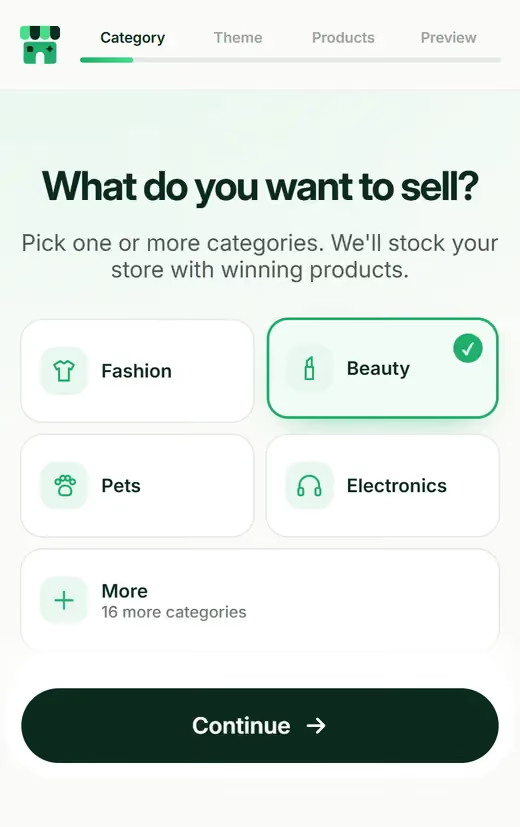
It is designed for phones first, then scaled up for desktop. Check it on your own phone during the preview.
Can I use my own domain?
Yes. You get a free .store domain for the first year, but you can connect a domain you already own instead.
Can I add pages later, like a blog?
Yes. It is a normal Shopify site, so you can add a blog, landing pages or extra collections whenever you want.
Does the Shopify site builder let you make normal pages too?
Yes. Under Online Store > Pages you can add an About page, a size guide, a contact page or anything else, and you can run a blog as well. Shopify is built around selling, but it's a full website, not just a cart.
How long does it take to build a Shopify website from scratch?
Doing it yourself, plan on a few days to a couple of weeks of evenings. Picking a theme is the quick bit; products, photos and writing pages eat the time. If you'd rather start from a finished draft, storebuilder.ai builds one in under a minute and you spend your time editing instead.
Can an AI Shopify website look as good as one made by a designer?
For a new store, often close enough. You get a clean layout, consistent fonts and written pages, which is most of what a first store needs. What AI can't do is know your brand the way you do, so swap in your own photos and adjust colors in Online Store > Themes > Customize.
Shopify website design tips for someone with zero design skills?
Stick to two fonts and one accent color. Use real product photos on a plain background, and make sure the first screen on a phone shows what you sell and why it matters. Most shoppers will see your store on their phone, so preview it there every time you change something.
Your Shopify website, ready to edit.
100% FREE to build. No technical work. A Shopify store that is yours from day one.
Build my FREE store